


 English
 français
 русский
 español
 português
 العربية
 Türkçe
 Polski
 Indonesia
 Ask any stone fabricator what kills their profit margin on a custom job, and they’ll probably tell you the same thing: bad templates and on-site cutting.
You send a guy out with a tape measure, cardboard strips, and a glue gun. He spends two hours templating an L-shaped kitchen countertop or a winding staircase. Then he drives back, someone spends another hour translating those notes into CAD, and you cross your fingers hoping the walls were actually square. If they weren't—and let's be honest, walls are never square—your installers end up grinding stone in the client's driveway, creating a cloud of silica dust and wasting half the afternoon.
That’s the exact headache the YCMEAS Digital Template Laser Scanning MeasureKit was built to fix. Instead of guessing angles or hauling physical templates back to the shop, you walk onto the job site with a 4.5kg case, set up a tripod, and let the laser do the heavy lifting.
More Than Just Kitchen Countertops
While standard kitchen islands and L-shaped tops are bread-and-butter jobs, the real test for any measuring tool is how it handles the weird stuff.
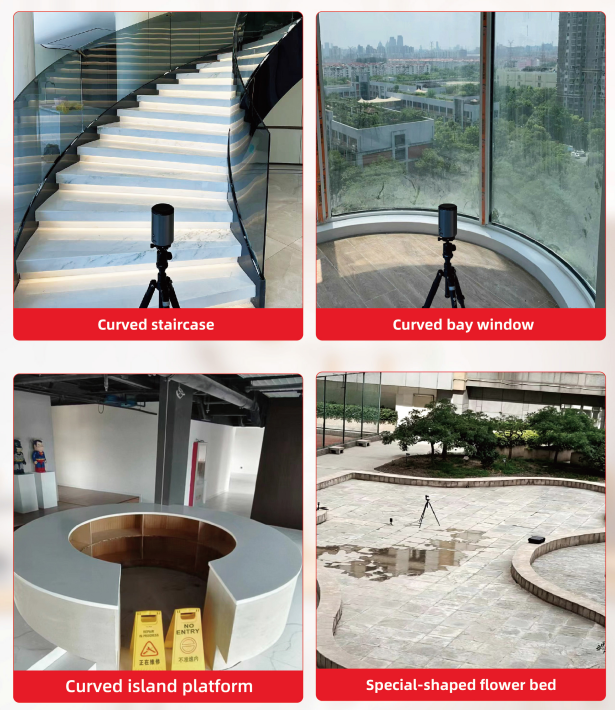
The YCMEAS head rotates a full 360 degrees and handles both 2D floor plans and vertical elevations. If you’re bidding on commercial work or high-end residential projects, this means you can use the exact same rig to shoot:
1.Spiral staircases and irregular steps where every single tread has a slightly different angle.
2.Arched windows and curved walls that are nearly impossible to template by hand without dozens of reference points.
3.Full-height shower walls and custom backsplashes where plumbing cutouts need to be dead-on.
How the Workflow Actually Looks on Site
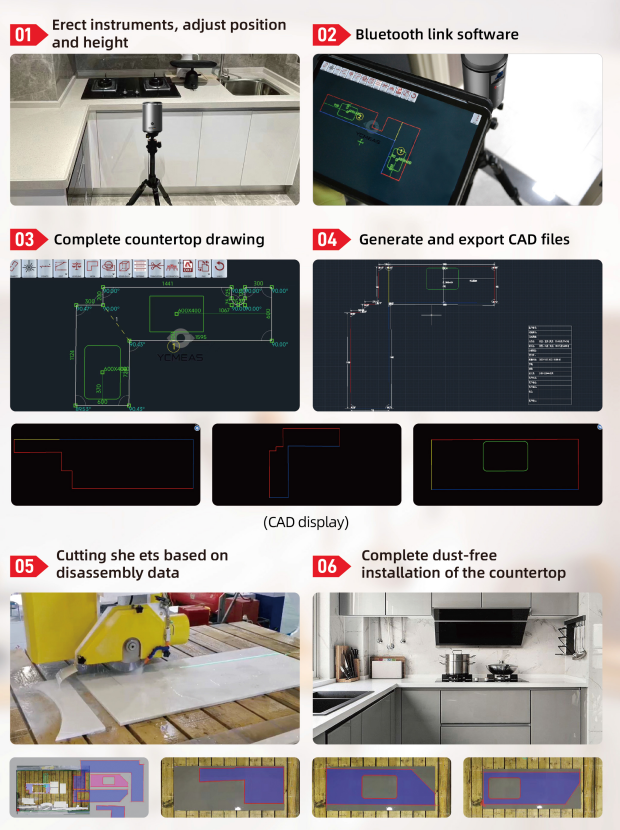
Nobody wants a piece of tech that requires an engineering degree to operate. If your field guys can use an Android tablet, they can run this system. Here is how a typical measure goes down:
- Drop the Tripod: Pull the scanner out of the case, mount it on the tripod, and level it roughly to counter height. (For tight spots like stair treads, the kit comes with a mini tripod too).
- Link Up via Bluetooth: Fire up the app on your phone or tablet (it runs on Android 7.0 or HarmonyOS in landscape mode) and pair it with the scanner.
- One-Click Scanning: The laser sweeps the room. You watch the true-to-scale layout draw itself on your screen in real time. No manual CAD drafting needed.
- Smart BOM & Color-Coding: Before you even pack up the tripod, the software breaks down the bill of materials (BOM) and color-codes the edges right there on site.
- Send Straight to the Shop: Export the finished drawing as a standard DXF file. You can email it back to the shop from the truck, or drop it onto the included USB flash drive.
- Cut and Drop In: Because the DXF file plugs directly into 4-axis and 5-axis bridge saws, waterjets, and CNC machining centers, your shop can start cutting slabs before the tech even gets back from the job site. When the crew goes back to install, the stone drops right into place. Zero on-site cutting, zero dust.
The Numbers That Matter (Specs Breakdown)
When you’re dealing with expensive quartz, granite, or sintered stone, "close enough" doesn't cut it. The YCMEAS system keeps tight tolerances:
1.Accuracy: Size error is kept under ±1mm (when tilt angle >40° and reflectivity >80%), with an angle error of ≤±0.02°.
2.Built for the Field: IP54 protection grade, designed for real job-site dust and water resistance.
3.Power: 4× 3.7V rechargeable lithium-ion batteries (1000mAh).
4.Laser Specs: Class 2 laser, 635nm, <1mW.
5.Dual Units: Toggle between mm and inches seamlessly.
YC360 Pro vs. YC360 Plus: Which One Fits Your Shop?
The MeasureKit comes in two models: the YC360 Pro ($6,000/set) and the YC360 Plus ($7,500/set). Both packages include the 4.5kg protective hard case, machine head, dual tripods (full & mini), extension rod, charger, batteries, and a USB flash drive (tablets for display only).
| Feature / Specification | YC360 Pro | YC360 Plus |
|---|---|---|
| Price | $6,000 / set | $7,500 / set |
| Effective Range | 0.05 – 5 meters | 0.05 – 8 meters |
| Dotting Measurement | Supported (2mm horizontal accuracy) | Not Supported |
| Reflecting Board | Not Included | Included |
| Angle & Size Error | ≤±0.02° / <±1mm | ≤±0.02° / <±1mm |
| Machine Compatibility | 4-axis & 5-axis bridge cutters, CNC centers, waterjets | |
The Bottom Line
At $6,000 to $7,500 a set, a digital templating kit is an investment. But do the math on how much one ruined slab of Calacatta quartz costs you—not to mention the labor hours wasted driving back and forth to fix a bad measure. Save two or three slabs a year and speed up your turnaround time from template to install, and the scanner pays for itself.


 IPv6-Netzwerk wird unterstützt